Self-Service Active Directory Group Management

Let department managers handle their own AD group memberships through a web browser. On-premises, simple, affordable.

Trusted by healthcare, education, and government organizations

Monument Health logo
Sanford Health logo
North Yorkshire Council logo
Universität Hohenheim logo
University of Dundee logo
Grammer AG logo

How It Works

From setup to self-service in six steps — using native Active Directory attributes with no schema changes

1. IT Assigns Group Managers in Active Directory

AD Group Manager Web reads the standard managedBy attribute that exists on every AD group. IT simply sets the manager on a group's properties in Active Directory Users and Computers or via PowerShell — no schema extensions, no custom database, no agents to install.

For groups that need multiple managers, the product also reads the msExchCoManagedByLink multi-value attribute. Alternatively, set a security group as the manager — any member of that group (including through nested group membership) can then manage the delegated groups.

2. Manager Opens the Web Portal and Sees Their Groups

With Windows Authentication (Kerberos), there is no separate login — the manager opens the portal in their browser and is authenticated automatically with their domain credentials. Basic authentication with AD username and password is also supported. The portal filters the view to show only groups where the logged-in user is designated as a manager — either directly, through a manager group, or via nested group membership.

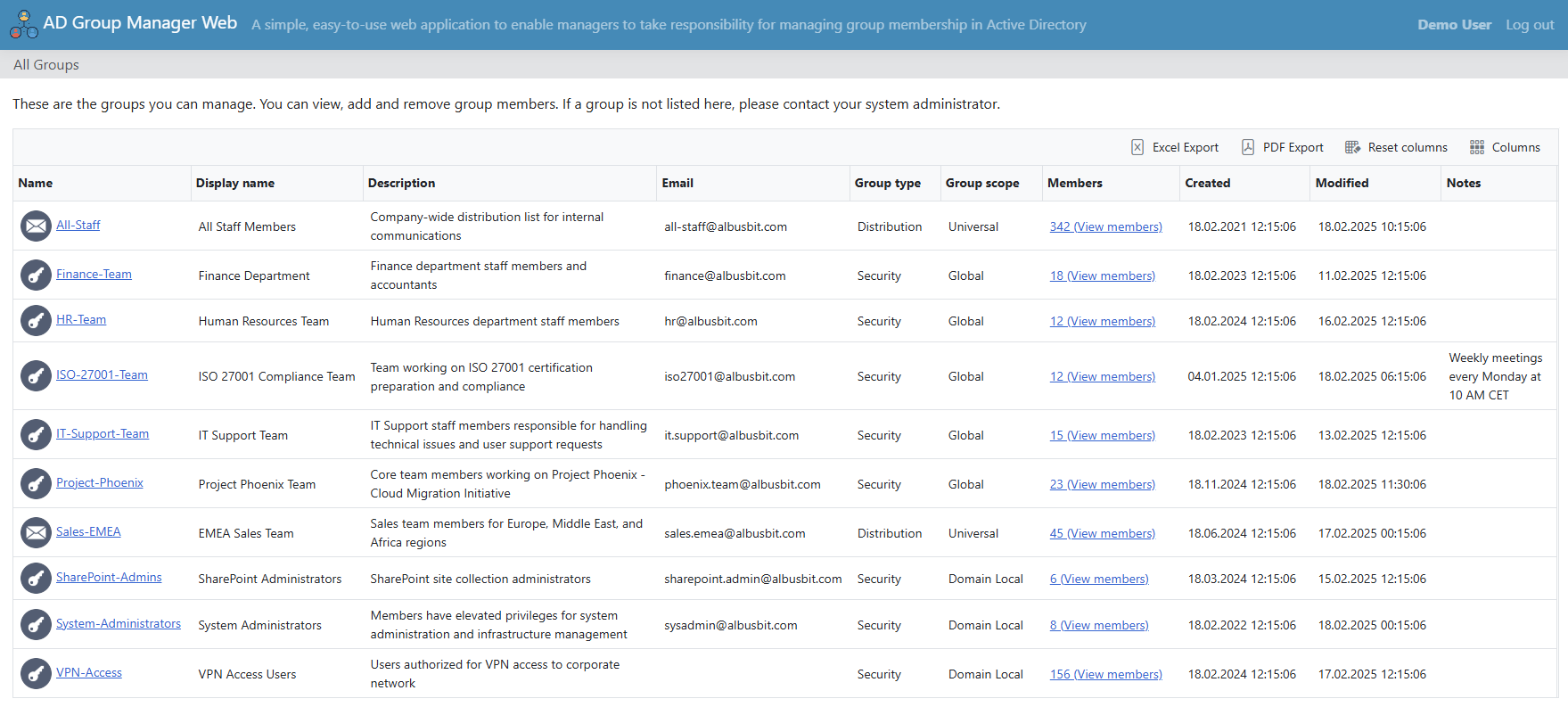
AD Group Manager Web — manager's view showing only their managed groups with member counts and group types

3. Manager Adds or Removes Members

Managers search for users by name or other AD attributes and add them to the group. Bulk operations allow selecting multiple members at once for quick additions or removals. IT controls which object types are searchable — users, computers, groups, and contacts can each be enabled or disabled independently through the admin panel.

4. Email Notifications Go Out Automatically

Instant email notifications can be enabled independently for four event types: members added, members removed, group properties edited, and user account information edited. IT configures the recipient list (To and CC) globally, and can customize the email subject and body templates using placeholders for the action type, object name, who made the change, and when.

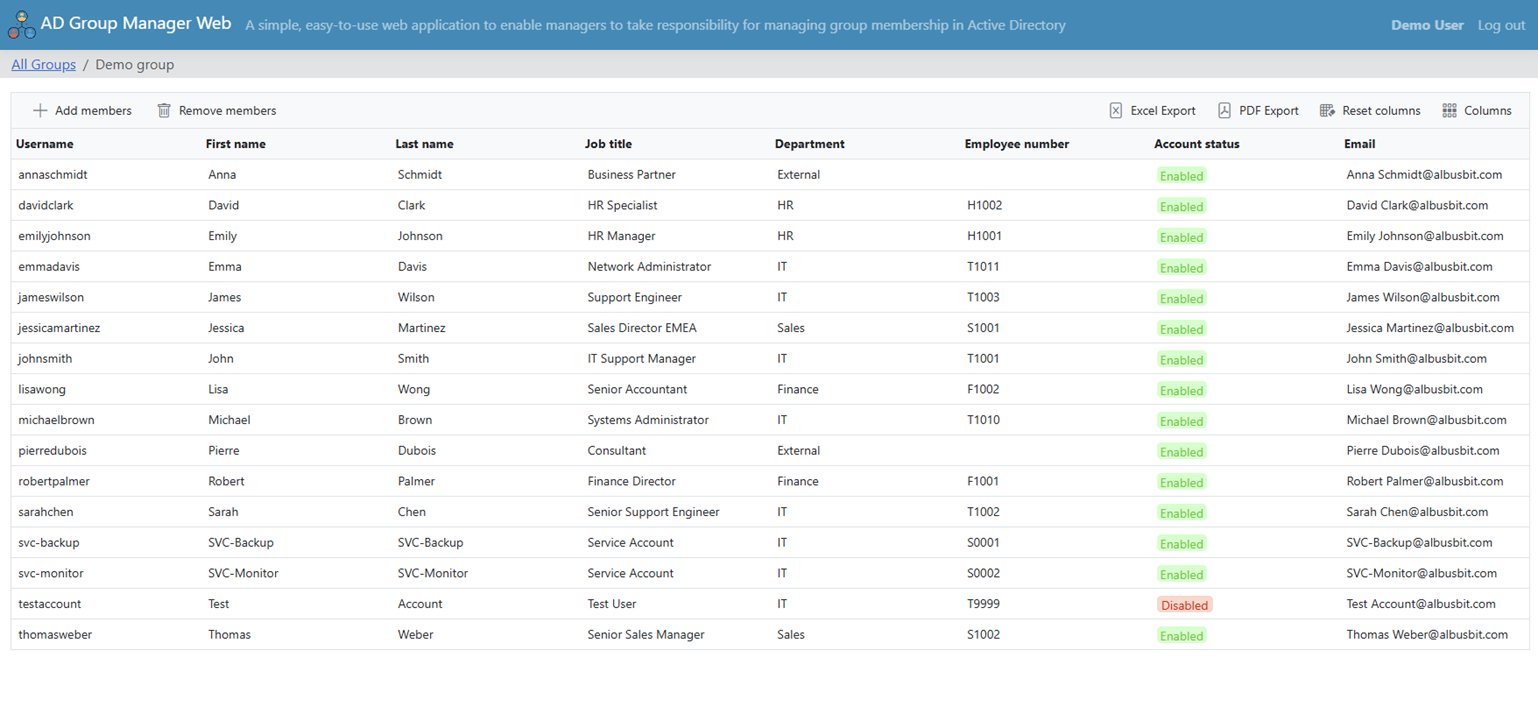
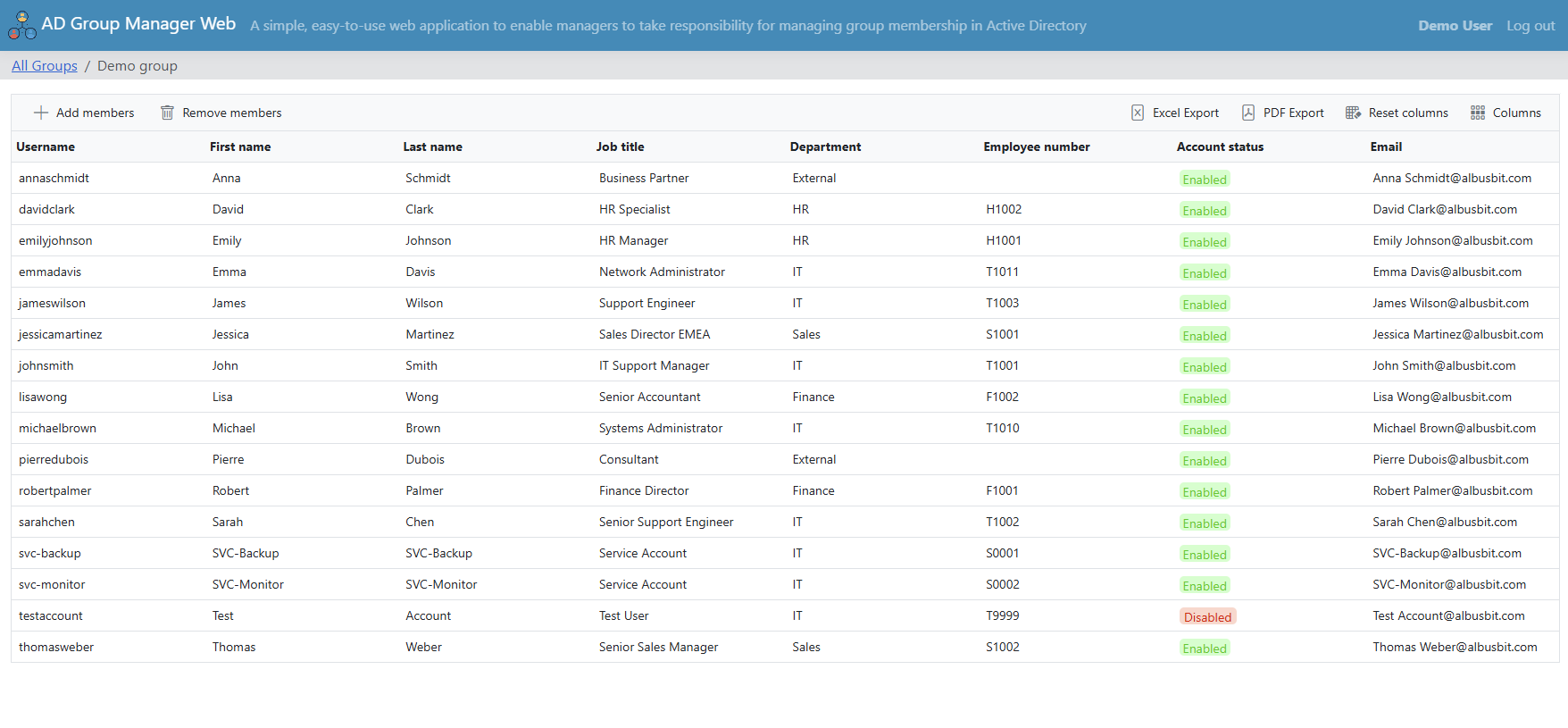
AD Group Manager Web — member management interface showing member details, bulk selection, and search

5. Every Action Is Recorded in the Audit Trail

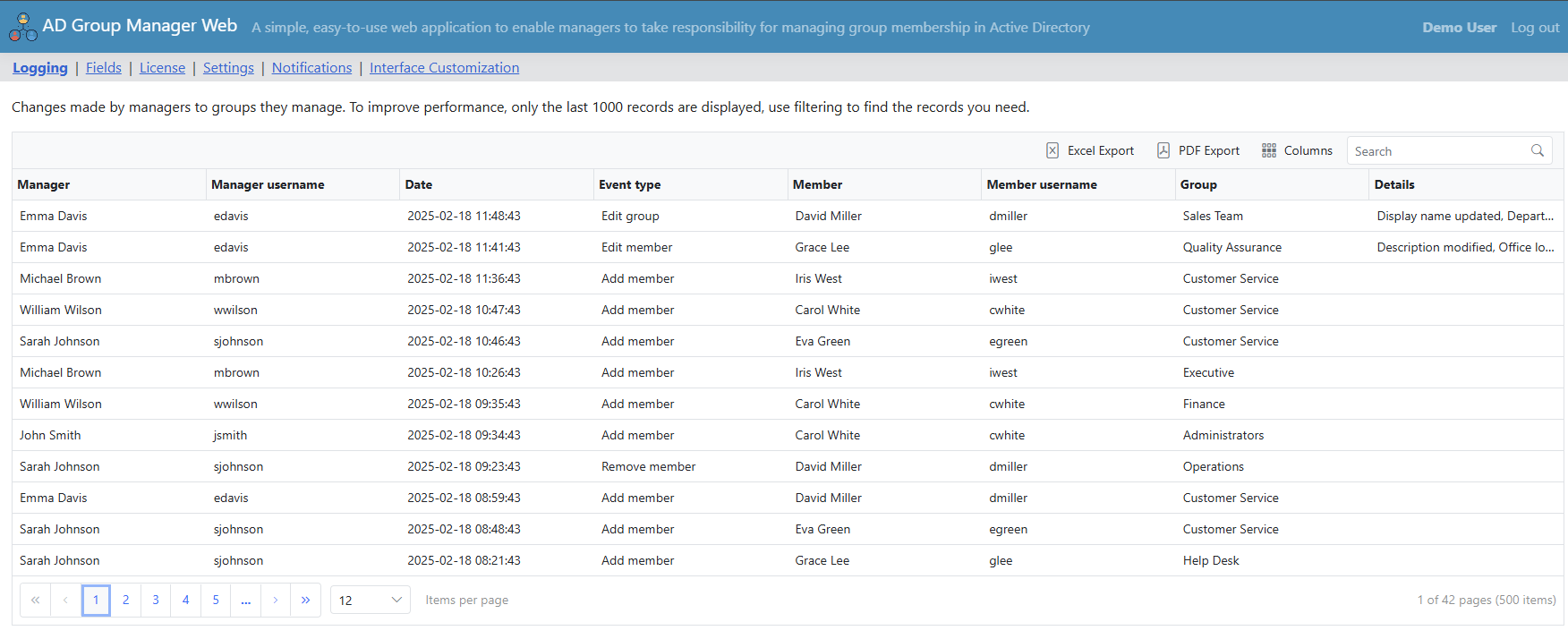
When activity logging is enabled, all additions, removals, and property changes are recorded — capturing who performed the action, the target user, which group was affected, and a timestamp. Logs are filterable and exportable for compliance requirements. Scheduled summary reports can be delivered by email daily, weekly, or monthly as HTML with a PDF attachment.

6. IT Maintains Full Control Through the Admin Panel

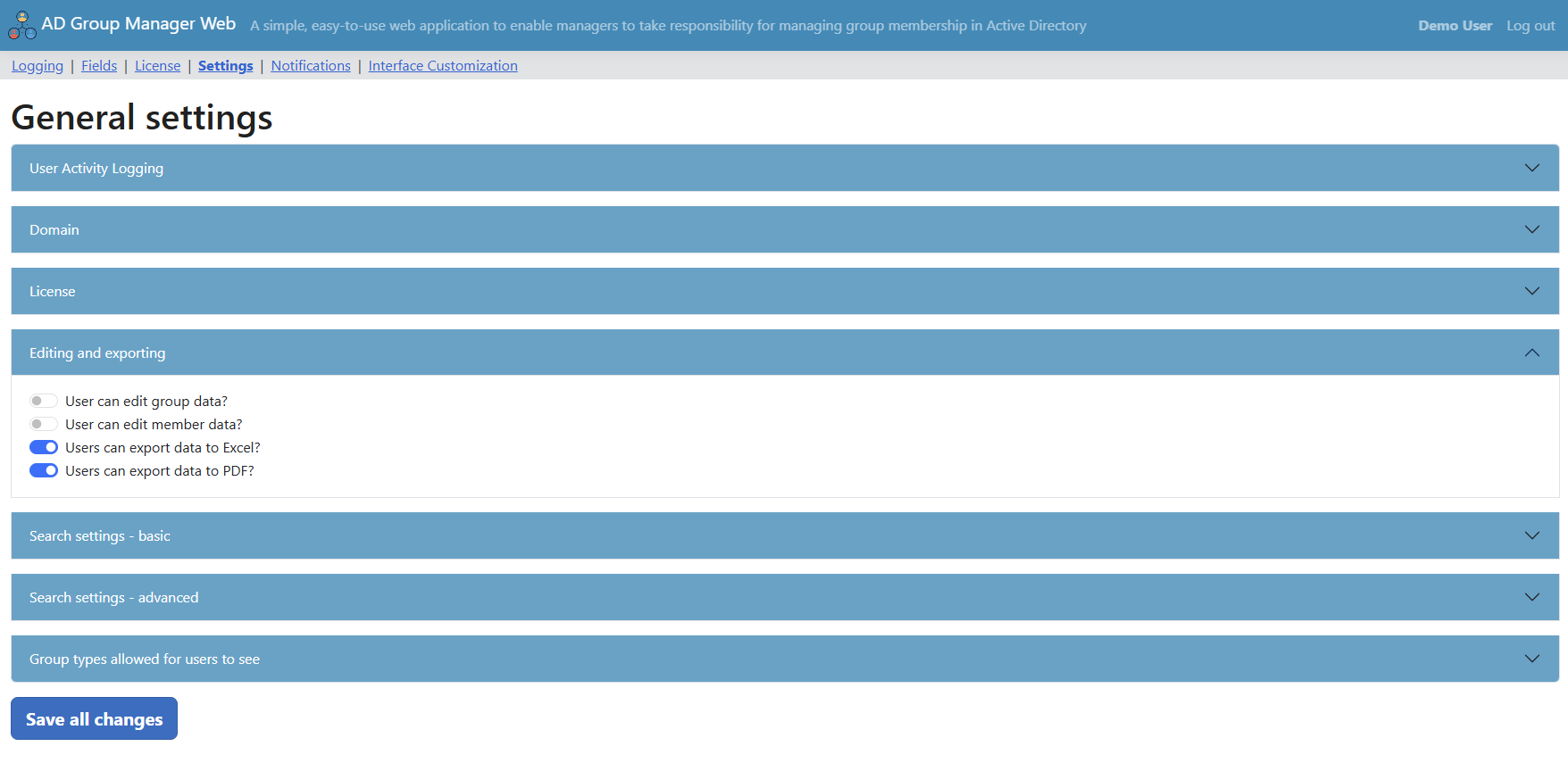
IT administrators configure exactly what managers can see and do: which AD fields are visible, which fields are editable, whether data export to Excel and PDF is allowed, minimum search query length, and whether wildcard symbols are permitted in searches. Optional permission checking validates the user's AD write-members ACL before allowing changes. Time-limited (TTL) group memberships can be enabled, allowing managers to add members that are automatically removed after a specified period.

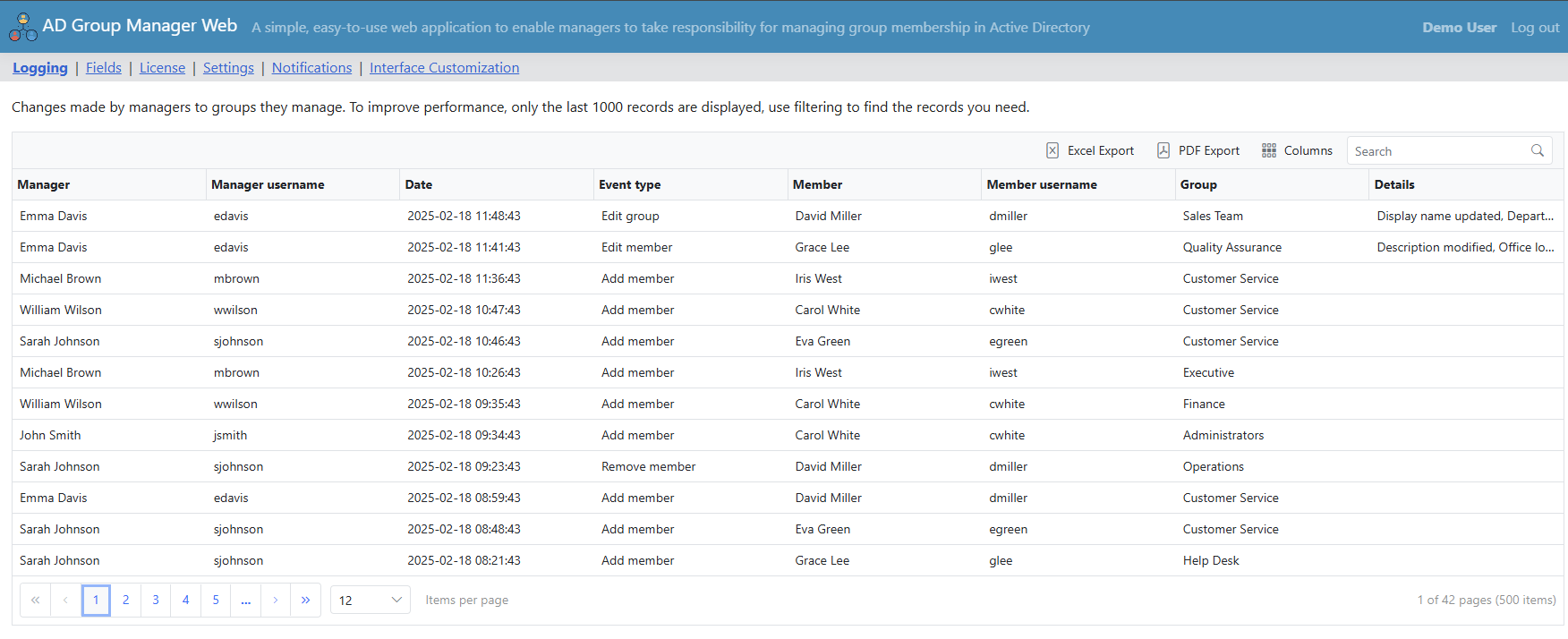
AD Group Manager Web — audit trail showing all group membership changes with timestamps and details

See It In Action

Features

Everything you need for secure, self-service Active Directory group management

Group discovery interface showing managed groups with member counts and group types

Group Discovery & Filtering

When a manager logs in, the portal automatically queries Active Directory for all groups where they are set as the manager — through the managedBy attribute, msExchCoManagedByLink, or via group membership (including nested groups). Only their managed groups appear in the list.

Groups are clearly labeled as Security or Distribution with their scope (Global, Domain Local, Universal). Each group displays its current member count with one-click access to the full membership list. Managers can customize which columns are visible and export the group list to PDF or Excel — if IT has enabled those export options in the admin panel.

Member management interface showing member details and search

Member Management

The member list shows each member's details — account status, department, contact information, and other AD attributes configured by IT. Managers search for people to add by name or other attributes, with IT controlling which object types are searchable: users, computers, groups, and contacts can each be independently enabled or disabled.

Bulk operations support selecting multiple members at once for quick additions or removals. When enabled by IT, time-limited (TTL) memberships allow managers to add members that are automatically removed from the group after a specified number of hours or days — useful for temporary project access or contractor onboarding. This feature requires Windows Server 2016+ with the PAM feature enabled.

Admin panel with access request and security configuration

Access Requests & Approval Workflow

When Group Discovery is enabled, users can search for groups across the organization and request access — with IT controlling which OUs are discoverable and which are excluded. Users submit a request with a message explaining why they need access, and the group manager receives an email notification to approve or deny it.

IT can enable direct email requests (opening a mailto link to the manager), in-app requests (handled entirely within the portal), or both. Administrators have a dedicated view of all access requests with filtering by status — Pending, Approved, Denied, or Cancelled — and can process any request manually if needed. All requests are logged for audit purposes.

Activity logs showing audit trail of all group membership changes

Audit Logging & Scheduled Reports

When activity logging is enabled, every action is recorded to a SQLite database — who performed it, the target user, which group was affected, what specifically changed, and when. The log covers member additions, removals, group property edits, and user account edits. Logs are filterable and exportable for compliance requirements such as HIPAA, SOX, and GDPR.

Scheduled summary reports can be configured to send automatically on a daily, weekly, or monthly basis. Reports are delivered as HTML emails with a PDF attachment containing managed group statistics, member counts, and recent changes — giving IT and compliance stakeholders ongoing visibility without manual effort.

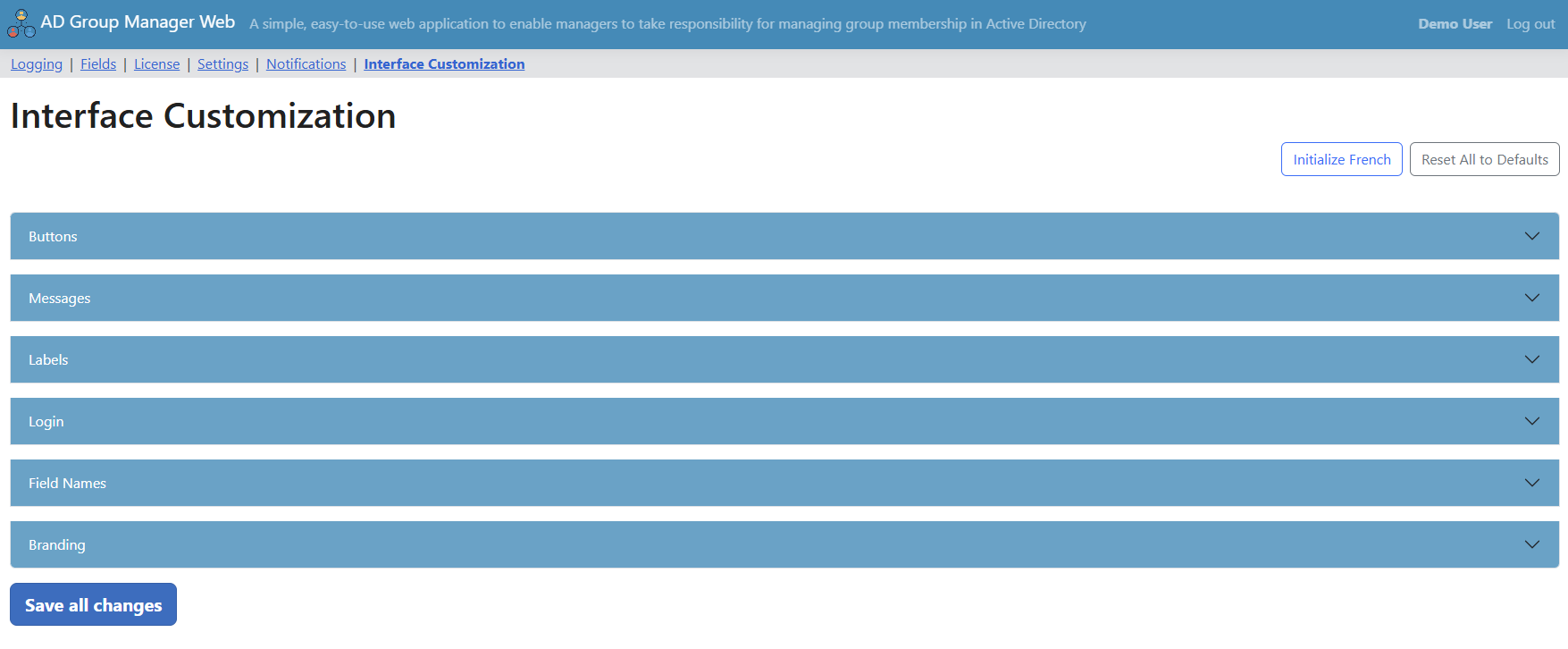
Notification and customization settings in the admin panel

Email Notifications & Customization

Instant email notifications can be toggled independently for four event types: members added to groups, members removed from groups, group properties edited, and user account information edited. IT configures the global recipient list (To and CC) and customizes the email subject and body templates using placeholders for the notification type, object name, who made the change, and the timestamp.

The entire interface can be branded to match your organization — custom logos (small and large), site title, tagline, footer text, and navigation bar background color. Multilingual support with fully customizable translations allows you to adapt every label in the interface to your language or preferred terminology. IT controls which AD fields are visible, which are editable, and configures search behavior including minimum query length and wildcard restrictions.

How AD Group Manager Web Compares

Choosing the right tool depends on what you need — here is an honest comparison

AD Group Manager Web ManageEngine ADManager Plus Netwrix Directory Manager PowerShell Scripts
Annual cost $1,295 From $795 (Professional)
Delegation features require Professional edition. Scales with technician count — up to $5,995+ for 10 technicians.
Contact for quote
Enterprise pricing, not published publicly.
Free
But requires ongoing development and maintenance time.
Setup time 15 minutes
Single IIS site + ASP.NET Core Hosting Bundle
Hours to days
Multi-component server application
Hours to days
Multi-component deployment
Weeks of scripting
Development, testing, documentation
Focus Self-service group membership management for department managers Full AD lifecycle: user provisioning, group management, M365, Exchange, Google Workspace, GPO, automation, 200+ reports Group lifecycle management: dynamic groups, attestation, provisioning/deprovisioning, hybrid AD + Entra ID sync Whatever you script
Self-service portal Yes — browser-based, designed for non-technical managers Yes — helpdesk delegation portal for IT technicians Yes — self-service portal for end users and group owners No
Target user Department managers and team leads IT admins and helpdesk technicians IT admins and group owners IT admins with scripting skills
Deployment Single IIS website on Windows Server Multi-component server application Multi-component deployment N/A
Cloud dependency None — fully on-premises, no internet required Optional cloud and hybrid features Optional cloud and hybrid AD + Entra ID None
Schema changes None — reads native managedBy and msExchCoManagedByLink attributes Uses its own database for configuration Uses its own database for configuration None

AD Group Manager Web is designed for organizations that need one thing done well: letting department managers handle their own AD group memberships through a simple web portal. If you need a full identity governance platform with user provisioning, M365 management, and dozens of other capabilities, ManageEngine or Netwrix may be a better fit. If you need focused, affordable, on-premises self-service group management with minimal setup — that is what this product is built for.

On-Premises Architecture

Everything runs on your network — no cloud dependency, no data leaving your infrastructure

Simple Deployment

AD Group Manager Web is an ASP.NET Core application that runs as a single IIS website on your Windows Server. Installation requires two prerequisites: the IIS server role enabled and the ASP.NET Core 10 Hosting Bundle installed. Run the setup wizard, configure the admin users in appsettings.json, and the portal is ready to use. There are no additional components to install, no agents to deploy on endpoints, and no external services to configure.

SQLite Database — No SQL Server Required

All application data — settings, field configuration, UI translations, audit logs, and access requests — is stored in a local SQLite database. There is no need to provision or maintain a separate SQL Server instance. Backup is straightforward: copy the SQLite database file and the appsettings.json configuration file.

Fully On-Premises, No Cloud Required

The application communicates directly with your Active Directory domain controllers over LDAP — there is no cloud component, no telemetry sent externally, and no internet connection required after installation. All group membership data, audit logs, and user activity stays within your network. This makes it suitable for organizations with strict data sovereignty requirements in healthcare, government, education, and finance.

Authentication

Two authentication modes are supported. Windows Authentication uses the Negotiate protocol (Kerberos with NTLM fallback) — users are authenticated automatically by IIS using their domain credentials with no separate login required. Basic authentication allows users to enter their AD username and password directly, with session management handled through encrypted cookies. Administrators are defined by AD username or AD group membership in the configuration file.

Trusted by Healthcare, Education, Government, and Enterprise

Organizations across nine countries rely on AD Group Manager Web to delegate group management securely

Monument Health logo
Sanford Health logo
HealthPartners logo
University of Dundee logo
Universität Hohenheim logo
Broward College logo
IBC International Business College logo
North Yorkshire Council logo
Valley Water logo
Grammer AG logo
Aebi Schmidt Holding AG logo
Lactalis Australia logo
Trinchero Family Estates logo
Festival Foods logo
Synergy IT Solutions logo

Customers in the United States, United Kingdom, Germany, France, Belgium, Denmark, Switzerland, Canada, and Australia

Simple, Transparent Pricing

$1295 / year

Single server installation with unlimited users and groups. Includes all updates and email support during the subscription period.

Purchase detailsDownloadRelease Notes • Questions? support@albusbit.com


Use of this site constitutes acceptance of our Privacy Policy and EULA. Copyright © Albus Bit SIA